
stute-engineering.de
  • Products
    • DCX apps
    • x1 Products
      • x1RTA
      • x1BAR
      • x1Generator
      • x1Scope
      • x1Designer
      • x1Analyzer x1Aremote
      • Accessory
  • Shop
  • News
  • FAQ
  • Download
  • License
  • Contact
  • Withdrawal

Select your language

  • Deutsch (Deutschland)
  • English (United Kingdom)

News

Update x1RTA 3.1.2

x1RTA 08 July 2026

Improved room analysis. Update for free now.

Update x1RTA Ver. 3.1

x1RTA 09 June 2026
The logger module now also features a moving Leq, with a window ranging from 1 to 600 minutes. The room acoustics module now displays the target range for RT60, C80, etc. as a green band in the measurement charts. There are also a number of quality improvements. Free update for x1RTA customers.

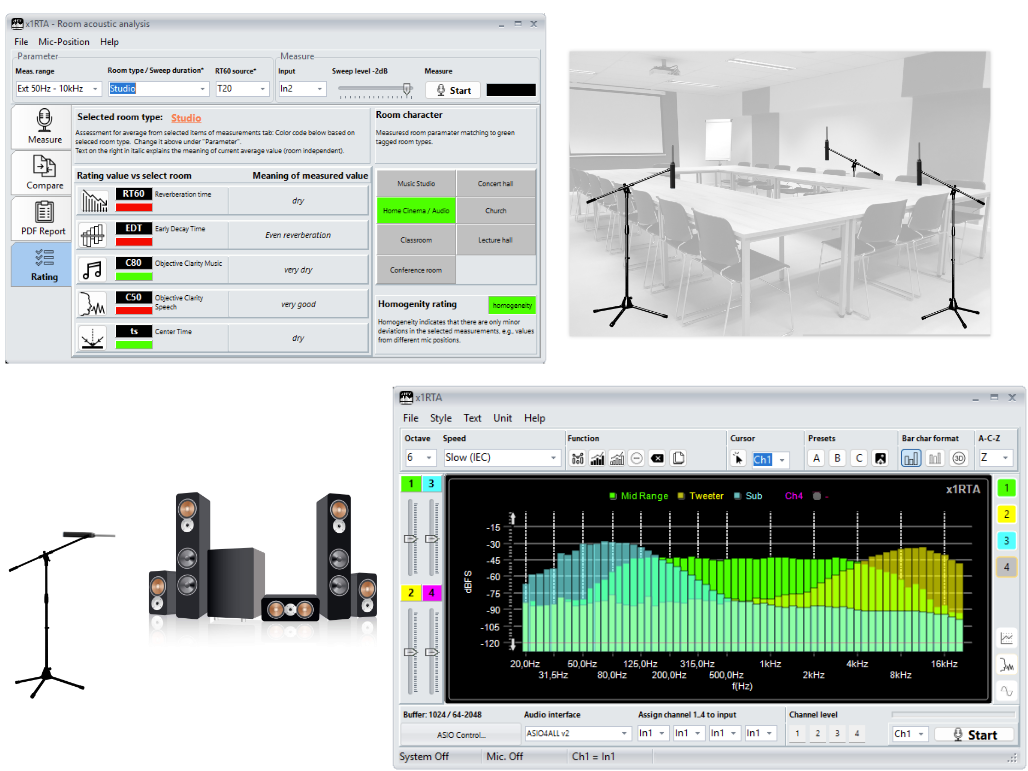
New product: Software x1RTA

x1RTA 05 May 2026

Precise 3D multi-channel RTA measurements and acoustic room analysis in a single application. With x1RTA you capture frequency spectra in real time (speakers, machinery, devices, ambient noise, etc.), enhance car audio with our sound profiles and assess room acoustics (passed/failed) using established acoustic parameters such as RT60 – for better decisions regarding acoustics and sound.
Update x1Scope 3.0.2

x1Scope 13 March 2026
  • New: The built-in sine wave generator now supports output to 4-channel sound cards
  • New: Frequency input for the sine wave generator via keyboard
  • New: Detect sound card input overload via color code
  • Improved: ASIO driver setup
  • Free update for x1Scope customers
x1Scope: Easily turn your sound card into a high-precision 192 kHz oscilloscope with up to 32-bit resolution on the y-axis. Ideal for high-resolution audio measurements. x1Scope: Scope + FFT + yt data logger + XY mode

Update x1Generator 3.1

x1Generator 17 February 2026
Seep log implemented, dark style added, the last masks for all signals are saved and loaded when the program is restarted, overwrite names for preset keys with prompt, stability improvements...
With the x1Generator, you can mix up to 3 sine tones for output, among other things—ideal for nonlinear distortion measurements. Test it for free!

Update DCX.Mixer 2.5.3 MS-Windows

DCX Apps 07 December 2025
Saved DCX2496 configurations are now automatically saved in the new default folder ‘C:\Users\Public\Documents\DCX.Mixer’, including the direct preset save buttons 1–6. If you already have your own presets, please copy them to this directory (*.DCC files).

Subcategories

DCX Apps

x1RTA

x1BAR

x1Scope

x1Generator

x1Analyzer

x1Designer

CD DVD

Page 2 of 6

  • 1
  • 2
  • 3
  • 4
  • 5
  • 6
© Stute Engineering. All Rights Reserved. Imprint / Data Privacy - Cookie widerrufen / withdraw
stute-engineering.de
  • Products
    • DCX apps
    • x1 Products
      • x1RTA
      • x1BAR
      • x1Generator
      • x1Scope
      • x1Designer
      • x1Analyzer x1Aremote
      • Accessory
  • Shop
  • News
  • FAQ
  • Download
  • License
  • Contact
  • Withdrawal

We use cookies

We use cookies on our website. Some of them are essential for the operation of the site, while others help us to improve this site and the user experience (tracking cookies). You can decide for yourself whether you want to allow cookies or not. Please note that if you reject them, you may not be able to use all the functionalities of the site.

Essential Always on
Necessary for the operation of the website. These cookies cannot be disabled.
Functional
Enable convenient features and the storing of preferences.
Statistics
Help us understand how visitors use the website (audience measurement).
Marketing
Used for advertising and tracking visitors across websites.
Other
More information | Imprint
CookieHint and Consent by reDim GmbH (Opens in a new window)